

When an application outage occurs, monitoring platforms such as Datadog and Splunk can quickly detect the issue and on-call paging systems such as PagerDuty and Splunk (VictorOps) alert the on-call site reliability engineer (SRE) responsible for responding. What happens next often determines how long customers experience the outage. The SRE must rapidly follow runbooks, which are structured, step-by-step operational guides that contain troubleshooting procedures, validation checks, escalation paths and even non-business-hour instructions.
In enterprise environments, these runbooks are frequently long, scattered across tools such as SharePoint and S3 and require cross-referencing multiple documents to resolve a single incident. This slows down the mean time to resolution (MTTR), especially for newer engineers who may not yet understand the product’s history or operational nuances. Language barriers can make this even harder: Most runbooks are written in English, and an on-call engineer who is less fluent may take significantly longer to interpret instructions during an outage. The complexity compounds when multiple applications are to be supported.
These challenges highlight a growing need for more intuitive, accessible and intelligent ways to surface runbook knowledge and provide context-aware generative AI (GenAI) responses during high-pressure incidents without forcing engineers to search through multiple documents.
With the maturing of GenAI and retrieval-augmented generation (RAG), AI which first retrieves relevant information from your company’s documents or data sources, then uses that information to generate a response can be used to build Chatbots for improving the efficiency of incident management.
AWS Bedrock provides an end-to-end ecosystem for RAG, creates text embeddings, stores them in Amazon OpenSearch Serverless vector databases, builds Bedrock AI Agents, chooses models from the Bedrock model catalog and integrates responses into ChatOps via AWS Chatbot with Microsoft Teams.
Architecture Overview
High-level architecture connects enterprise runbooks stored in Amazon S3 or SharePoint to an Amazon Bedrock Agent that uses RAG to deliver contextual, actionable responses directly inside Microsoft Teams. The system is built around five core components: Storage (S3/SharePoint), embeddings and vector search (Amazon OpenSearch Serverless), inference and orchestration (Amazon Bedrock), ChatOps delivery (AWS Chatbot/Amazon Q Connector) and optional alert fan-out (Amazon SNS).

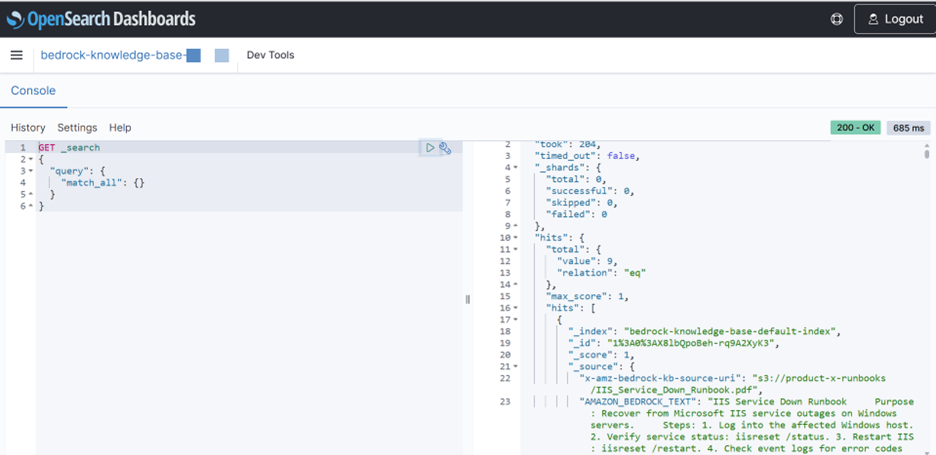
At ingestion time, runbook documents are extracted from S3, converted into text chunks and transformed into embeddings using a Bedrock embedding model such as Amazon Titan Text Embeddings. These embeddings are stored in Amazon OpenSearch Serverless as vector representations, enabling Bedrock to perform semantic retrieval during a user query.
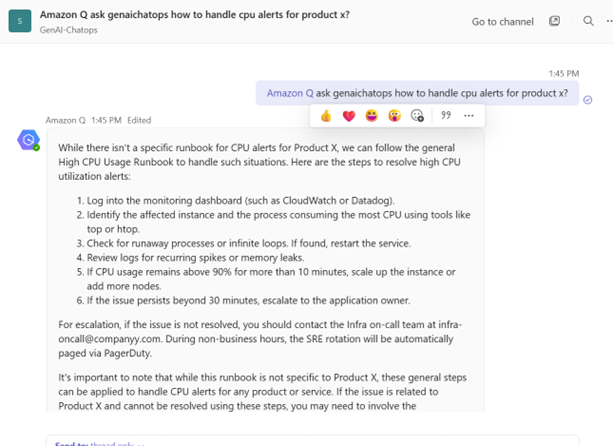
When an engineer interacts with the ChatOps assistant in Microsoft Teams, the request flows through the Amazon Q (AWS Chatbot) connector, which invokes the Bedrock Agent. The agent retrieves the most relevant runbook sections from OpenSearch, applies the selected LLM (e.g., Claude 3 Haiku or Llama 3 via the Bedrock model catalog) and generates a grounded, context-aware response. The output is sent back through the Chatbot integration and is displayed in Teams as the GenAI ChatOps assistant’s answer.
Optional: Amazon SNS can be used for alert fan-out. Monitoring tools provide alerts to SNS, which can trigger a Lambda function that calls the Bedrock Agent to pre-summarize incidents and push recommended remediation steps into Teams — so engineers can see suggested actions the moment they join the channel.
Since AWS Chatbot invokes the Bedrock Agent on behalf of the Teams user, the Chatbot IAM role must include the following minimum permissions. The key requirement is bedrock:InvokeAgent, without which the connector cannot call the RAG agent. If the agent uses a custom model or a specific embeddings model, the Chatbot role may also need bedrock:InvokeModel for those models.
Challenges With Traditional Incident Response
Pain point — challenges of fragmented runbooks and high MTTR: In a typical production outage, monitoring platforms such as Datadog and Splunk detect anomalies and trigger alerts. On-call paging systems such as PagerDuty/VictorOps then notify the engineer responsible for responding. Once alerted, the SRE must quickly consult operational runbooks to diagnose and remediate the issue. Response speed and accuracy directly impact MTTR, the key metric for measuring incident recovery time.
Runbooks are structured, step-by-step guides that outline troubleshooting procedures, validation checks, escalation paths and non-business-hour instructions. However, in enterprise environments, these runbooks are often lengthy, fragmented across document management systems such as SharePoint and Confluence and require cross-referencing several documents to resolve even a single alert. This slows down the incident response process and increases MTTR.
The challenge is amplified for newer engineers who may not yet understand the product’s operational history, as well as for on-call staff who are less fluent in English, since runbooks are typically in English. As the number of applications supported grows, so does the cognitive load of navigating multiple runbooks under pressure, further contributing to delays in remediation.
Introducing GenAI and RAG Into ChatOps
ChatOps brings automation and operational intelligence directly into collaboration platforms like Microsoft Teams, enabling engineers to interact with systems in real-time during an incident. By integrating GenAI through AWS Bedrock, we can move beyond static runbooks and deliver an intelligent assistant capable of understanding queries and alert screenshots, interpreting context and generating meaningful responses. However, large language models (LLMs) by themselves do not have knowledge of internal systems, product architecture or remediation procedures. This is where RAG becomes essential — it grounds the model in your company’s own operational data so that responses are accurate, verifiable and aligned with established runbook guidance.
RAG works by transforming runbook documents into embedding vectors using Bedrock embedding models such as Amazon Titan Text Embeddings. These vectors are stored in a high-performance vector search engine, Amazon OpenSearch Serverless, which supports similarity-search techniques similar to Facebook AI Similarity Search (FAISS). When an engineer asks a question in Microsoft Teams, the Bedrock Agent retrieves the most relevant chunks of runbook content using semantic similarity search, then feeds that information into a Bedrock-hosted LLM (e.g., Claude 3 Haiku or Llama 3). The model generates a concise, context-aware answer rooted directly in the retrieved runbook sections, ensuring that the output follows internal best practices and operational policies. This combination of ChatOps, GenAI and RAG forms a powerful workflow that reduces cognitive load on engineers, shortens MTTR and enables consistent and reliable incident response at scale.

Creating a Knowledge Base With Vector Store

Vector-Augmented Document Storage Inside Amazon OpenSearch Serverless
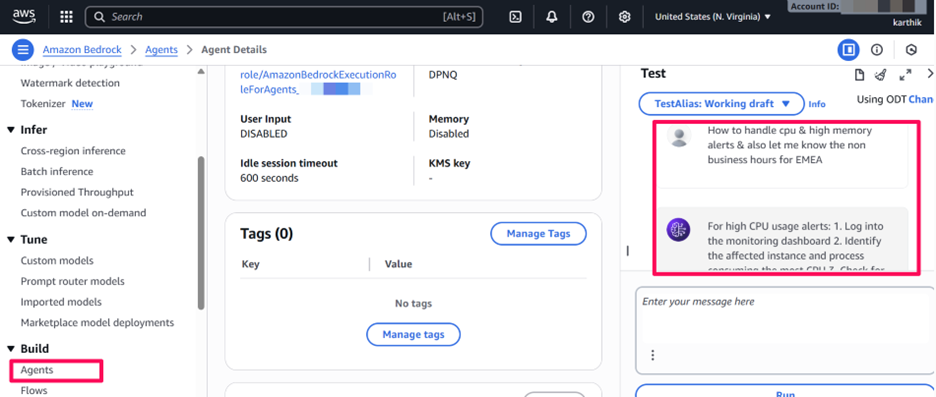
Bedrock Agent Returning a Generated Response Based on RAG
Step-by-Step Implementation
- IngestRunbooks: Import runbooks from S3 or SharePoint, extract text and split into chunks with metadata (service, severity, region).
- CreateEmbeddingsand Index Them: Generate embeddings with Amazon Titan Text Embeddings and store them in Amazon OpenSearch Service/Serverless for vector search.
- Configure the Bedrock Agent: Create a Bedrock Agent with incident-response instructions and connect it to the OpenSearch vector index for RAG retrieval.
- Install andLinkAmazon Q in Microsoft Teams: Add the Amazon Q (AWS Chatbot) app in Teams, sign in, create a connector and attach your Bedrock Agent using the Agent Alias ARN.
- AddRequiredIAM Permissions: Ensure that the AWS Chatbot IAM role includes permission to invoke the Bedrock Agent.
- Test andTune Retrieval: Run sample incidents (CPU spike, memory leak, service outage) and adjust the agent prompt,Top-K retrieval, temperature and grounding settings.
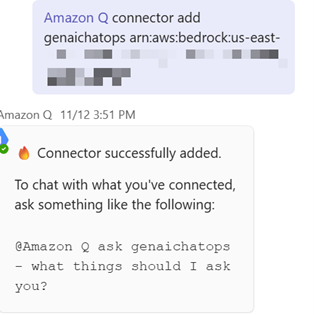
Adding the Bedrock Agent Connector, Query and Response From MS Teams
Multilingual (Spanish) Query Response
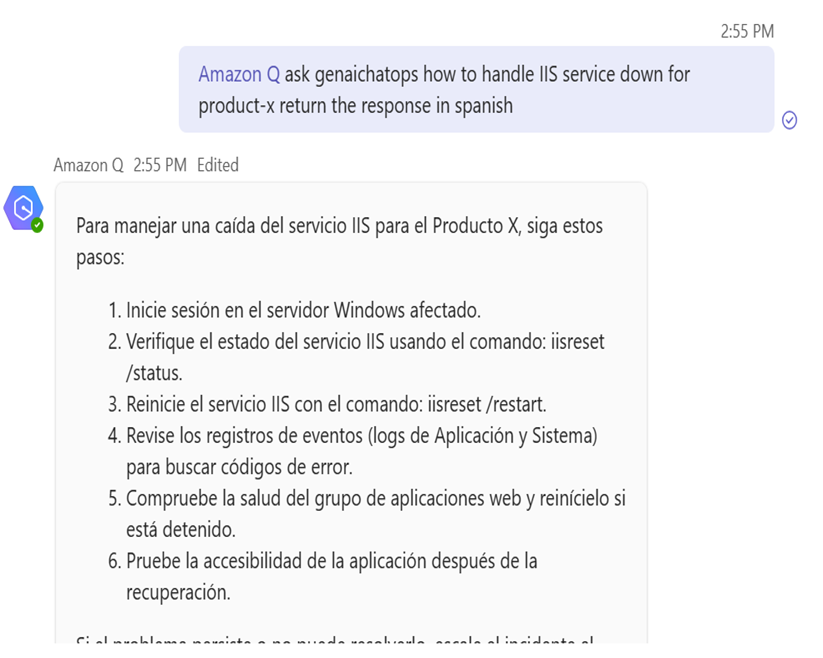
Image-Based Query Response

Reducing Hallucinations and Improving Accuracy
To minimize hallucinations, it is critical to tune both retrieval and generation parameters. Start by experimenting with different Top-K values so that the agent retrieves sufficient relevant context without overwhelming the model. Keep the model temperature low for factual queries and clearly instruct the agent to answer only from the provided context or explicitly say when it does not know the answer. Logging retrieved documents alongside responses helps validate whether the system is grounded in the correct runbooks.
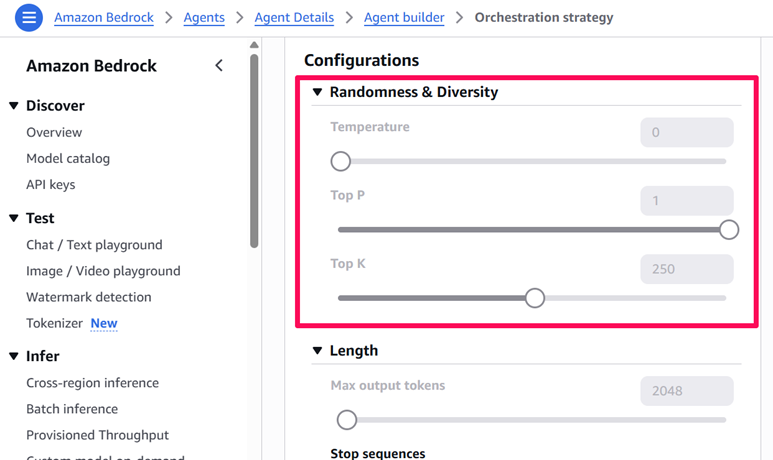
Temperature: Controls how deterministic the model is; lower values reduce randomness and minimize hallucinations.
Top-P: Limits token selection to the most probable subset of choices, improving response stability.
Top-K: Restricts generation to the Top-K most-likely next tokens, tightening accuracy and grounding.
Security and Access Control
As the assistant is accessible from a shared Microsoft Teams channel, enforcing strong security boundaries is essential. Use IAM roles and resource policies to ensure that only the Teams session role can invoke the Bedrock Agent — for example, granting bedrock:InvokeAgent on the specific agent-alias ARN. The Bedrock Agent’s execution role should be tightly scoped to only the required S3 buckets, OpenSearch collections and Lambda functions.
Apply KMS encryption for S3, OpenSearch and Bedrock data and enable CloudWatch logging for full auditability. Additionally, implement Bedrock Guardrails to filter sensitive content, enforce safety constraints, prevent leakage of internal information and ensure the assistant responds within approved operational and compliance boundaries.
Operational Outcomes
Once deployed, the GenAI ChatOps assistant can significantly reduce MTTR by eliminating context-switching and making operational knowledge accessible in just a few keystrokes. New engineers can ramp up more quickly by relying on consistent, AI-guided workflows, while experienced SREs benefit from faster access to nuanced runbook content and historical context.
Key Takeaways
GenAI with RAG enable engineers to query runbooks conversationally inside Microsoft Teams, reducing MTTR and eliminating the need to manually search long runbooks.
AWS Bedrock provides a fully managed platform for embeddings, vector search and agent orchestration without requiring teams to operate infrastructure.
AWS Chatbot/Amazon Q Developer makes it simple to expose Bedrock Agents in ChatOps, enabling real-time operational assistance directly in Teams channels.
Bedrock Agents now support models with screenshot/image input, allowing engineers to upload error messages, logs or console screenshots for context-aware troubleshooting.
Multilingual question and response support allows global teams to query English runbooks using their preferred language — critical for follow-the-sun on-call operations.
Tuning retrieval depth (Top-K), temperature and IAM permissions ensure that the assistant remains accurate, safe and properly access-controlled.
Conclusion
By combining AWS Bedrock, RAG and Microsoft Teams, organizations can shift incident management from a manual, document-driven process to an AI-augmented workflow that boosts speed, consistency and resilience. What once required digging through scattered runbooks can now be resolved through a single conversational interface grounded in enterprise knowledge. As GenAI capabilities mature — and as teams build trust in AI-assisted operations — the question is no longer whether AI will become a part of the incident response toolkit, but how quickly organizations adapt to a world where intelligent, context-aware assistants become the new first responders in DevOps.


Karthikeyan Rajamani is a senior cloud and DevOps architect with more than 30 years of experience in enterprise software engineering, AI/ML systems, and large-scale infrastructure. At Thomson Reuters, he has delivered major operational improvements, including reducing MTTM by 60% with Generative AI and driving over $1M in annual cloud cost savings. Karthikeyan previously founded two technology companies and has built platforms serving hundreds of thousands of users. He holds an M.S. in Computer Science from the University of Texas at Arlington and is a member of IEEE, ACM, and Tau Beta Pi.