

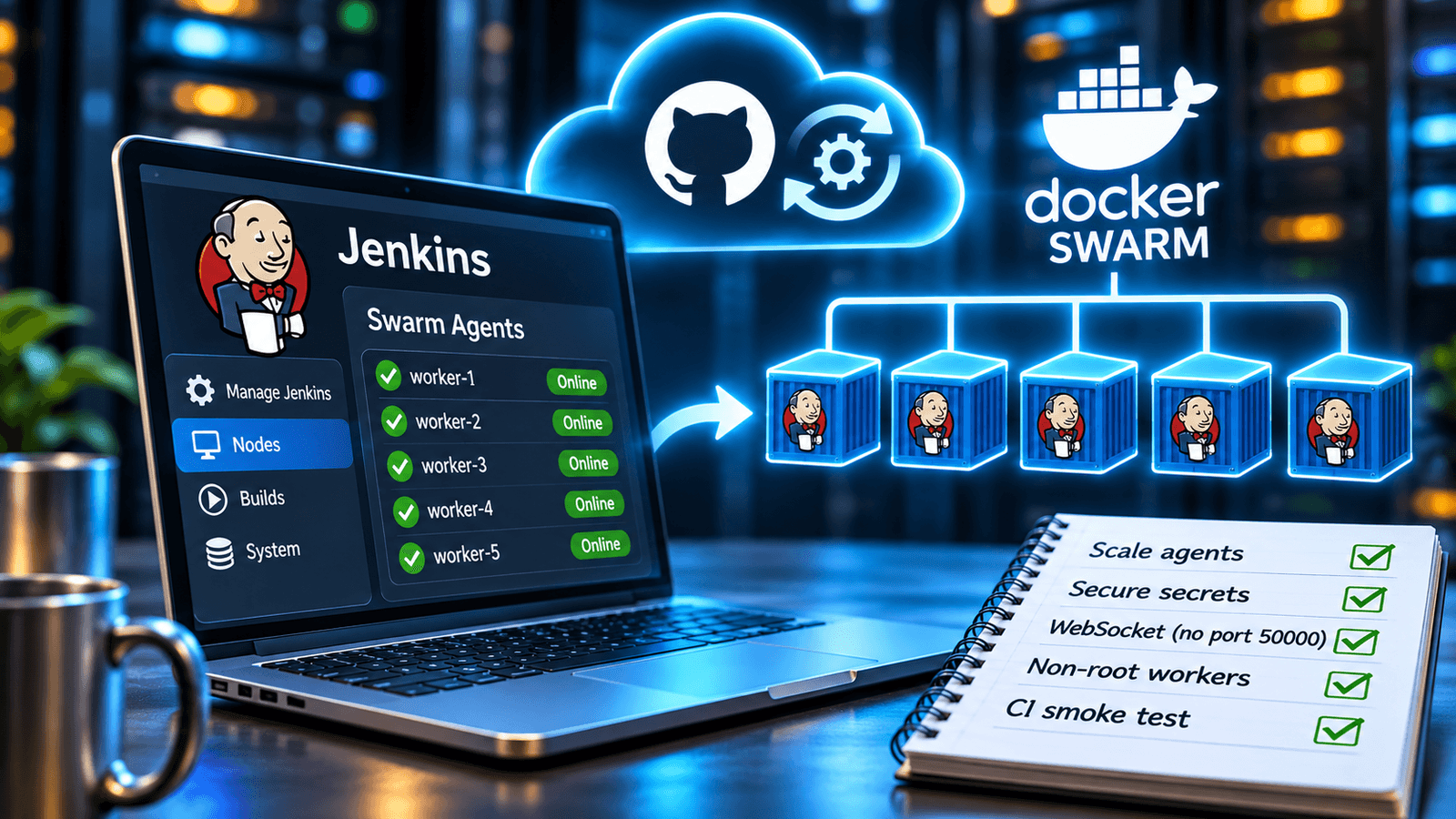
The manual process for registering new Jenkins build agents is long and involves several steps: opening “Manage Jenkins” → “Nodes”; filling out the configuration forms; retrieving secrets from the Jenkins UI; connecting to the host via SSH; and running the command to start the agent.
This manual method is acceptable in smaller-scale environments, but it becomes less efficient as the environment grows, since the same steps must be repeated for each new node.
The Jenkins Swarm Plugin helps with part of this: new workers register themselves, so capacity is quick to add. It does not fix a mismatch between an agent and its Jenkinsfile. Every replica gets the same default labels (swarm Docker), so scaling gives you more identical workers. Workers with different labels or images would need separate services.
This implementation differs from a typical Jenkins deployment in a few ways. Credentials are Docker secrets rather than environment variables. Workers connect over WebSocket, so the controller does not publish a separate agent port. Workers log in with their own agent account and run as a non-root user, and the controller itself runs no builds. A CI smoke test checks that a worker can connect before the images are published.
Manual Vs. Automated Node Registration
The Jenkins Swarm Plugin automatically registers workers with the controller. In the manual setup described above, each node had to be created and configured. With this plugin, new workers register themselves. Because Docker Swarm scales up and down using a “replica” concept, build capacity can be increased by issuing a single command instead of a lengthy manual procedure. For example, to scale the worker service from 1 to 5 replicas, the following command is used:
docker service scale jenkins_worker=5
Each new replica registers with Jenkins when it starts. Scaling down is less tidy. Docker Swarm chooses which replicas to stop and sends them SIGTERM. In one test with five workers and five running builds, we scaled to one: the four builds on the stopped replicas failed, and the build on the surviving replica finished. The stopped nodes were gone from the Jenkins node list about a minute later (checked once). We did not test Pipeline jobs or more than one node. Since you cannot choose which replicas are stopped, scale down when no builds are running.
Architecture
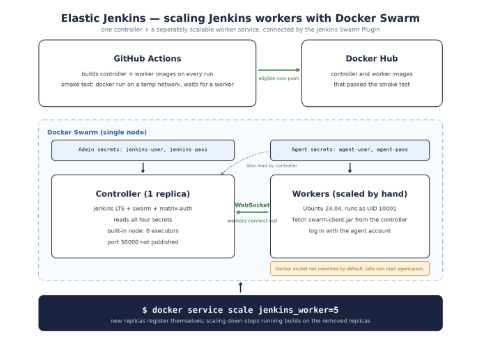
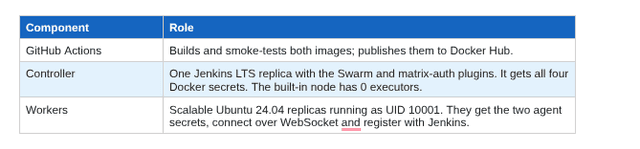
The stack is one Jenkins controller and one worker service that can be scaled independently. Each worker downloads the Swarm client from the controller and connects over WebSocket. GitHub Actions builds and smoke-tests both images on every run, and publishes them to Docker Hub on a push to main, on a v* release tag, or on a manual run from any branch.
When a worker starts and does not find swarm-client.jar, it downloads the file from the controller, so the worker image does not need its own copy. It then connects to the controller over WebSocket. WebSocket support needs Swarm plugin 3.22 or later; the repo pins 3.51. The stack does not publish port 50000.
Worker Startup
The essential parts of worker/start.sh are shown here. Startup validation and some of the configurable options have been removed from this example:
JENKINS_URL="${JENKINS_CONTROLLER_URL%/}/"if [[ ! -f /home/jenkins/swarm-client.jar ]]; then wget "${JENKINS_URL}swarm/swarm-client.jar" \ -O /home/jenkins/swarm-client.jarfijava -jar /home/jenkins/swarm-client.jar \ -url "${JENKINS_URL}" \ -username "$(</run/secrets/agent-user)" \ -passwordFile /run/secrets/agent-pass \ -name "worker-${HOSTNAME}" \ -fsroot "${WORKER_ROOT}" \ -executors "${SWARM_EXECUTORS:-5}" \ -labels "${SWARM_LABELS:-swarm docker}" \ -webSocket
Three things to note:
- The JAR comes from the controller when it does not exist within the worker container. It is not included in the worker image.
- Credentials come from /run/secrets/ and are not passed as environment variables. Workers use a separate agent account (see the security section below).
- –webSocket means the worker connects out to the controller. The controller does not need to publish port 50000, and traffic uses ordinary HTTP(S). Workers did not need inbound firewall rules in the older mode either. The SWARM_WEBSOCKET variable controls the flag and defaults to true.
Behind a TLS proxy, the proxy also has to pass the WebSocket Upgrade and Connection headers, and both wget and Java have to trust the certificate. We have not tested that setup.
Security: What We Set up and What We Checked
Separate admin and agent accounts. Four Docker secrets: the admin pair goes to the controller only, and the agent pair goes to the controller (which creates the account) and the workers. The agent account has Hudson.READ and a few Computer permissions through matrix authorization. CI checks only that it gets 403 on /manage. On a deployed worker, a job could not find the admin secret.
Warning: any job on a worker can read the agent password. Docker mounts secrets with mode 444, so running as a non-root user does not hide /run/secrets/agent-pass. That is the agent account’s password, not the admin’s. Do not run untrusted jobs on these workers.
The .env file. It holds both passwords on the host and is excluded from Git. Keep it private and limit who can reach the Docker host.
Anonymous access and CSRF. security.groovy grants no permissions to anonymous users and enables CSRF protection. One manual request to /jenkins/api/json without credentials returned 403.
No builds on the controller. The built-in node has 0 executors. Before we set that, a job on the built-in node ran inside the controller container and could read /run/secrets/jenkins-pass. Jobs with no label now run on a worker, and jobs labelled built-in wait in the queue.
Workers run as UID 10001. Jobs that run apt-get or write to /etc fail, which we saw. Jobs that need extra packages can use an extended worker image.
The Docker socket is not mounted. stack.yml has a commented opt-in for Docker builds, which we did not test. With the socket mounted, any job can control the host’s Docker daemon, and running as non-root no longer helps.
HTTP by default. The admin password is sent with Basic authentication, and workers download an executable JAR over HTTP and run it. The stack publishes port 8080 on the host, not only on loopback. For this local demo, restrict access to port 8080; use HTTPS when traffic crosses an untrusted network. One way to do that is a TLS-terminating proxy in front of Jenkins, with direct access to port 8080 blocked and JENKINS_CONTROLLER_URL set to the HTTPS address. We did not test that setup.
Persistent Agent Pool Versus On-Demand Agents
An alternative is the Swarm Agents Cloud plugin, which starts agents on a Docker Swarm cluster as jobs need them. It is community-maintained; we have not tried it, and it is not the older, similarly named docker-swarm-plugin.
The choice is mostly about which trust boundary you accept. With the persistent pool used here, the controller holds no Docker credentials, but any job on a worker can read the agent password, and with the socket mounted a job controls the host’s Docker daemon. With on-demand agents, the controller needs access to the Swarm manager’s Docker API, which is a powerful credential in one place.
The pool size here is set by hand (WORKER_REPLICAS or docker service scale), not by queue length. Which model fits depends on how much your build load varies and how much you trust the people who can submit jobs. We have not compared the two.
Testing the Setup Within Continuous Integration
A successfully built image does not mean a worker can connect to Jenkins, so the GitHub Actions workflow starts the controller and a worker with docker run on a temporary network and waits for the worker to connect. It then checks that Jenkins reports at least two nodes, that the admin account gets 200 and the agent account gets 403 on /manage, that the worker is not running as root, and that the built-in node has 0 executors. Pull requests build and smoke-test both images but do not publish them. On the runs that do publish, the images pushed are the ones that passed. It does not deploy a Swarm stack, test scale-down or HTTPS, or mount the Docker socket.
Getting Started
git clone https://github.com/sangharshcs/deploy-jenkins.gitcd deploy-jenkinscp .env.example .env# set JENKINS_SERVER_IP, JENKINS_USER, JENKINS_PASS, AGENT_USER, AGENT_PASS./scripts/deploy.sh
Swarm mode must be enabled first (docker swarm init). Fill in the five variables in .env, which should stay private, and use two different passwords. The deploy script builds both images, creates the four Docker secrets, and deploys the stack. It also checks that the controller’s data directory (CONTROLLER_ROOT) is writable by UID 1000 and prints the fix if not. It creates a secret only if it does not exist yet, so editing .env later changes nothing: to change credentials, run stop.sh, which removes the stack and the secrets, and deploy again. This rotation path has not been tested end to end. The service allows up to 10 failed container restart attempts with a 10-second delay between them. This is not a fixed controller startup deadline; check docker service ps and worker logs if workers fail to connect. To scale up, run:
docker service scale jenkins_worker=5
This setup is meant for a single node. deploy.sh builds the images locally with a timestamp tag and deploys with –resolve-image never, so other nodes cannot pull them unless you push the images and set CONTROLLER_IMAGE and WORKER_IMAGE. The controller keeps its data in a host directory and only has a node.role == manager constraint, so on a multi-node cluster it could start on another node with an empty Jenkins home. A node label or shared storage would be needed. We did not test multi-node.
Hardening Checklist
- Put TLS in front of Jenkins and block direct access to port 8080 (untested here).
- Keep .env private and limit access to the Docker host.
- Keep the built-in node at 0 executors.
- Leave the Docker socket unmounted unless every job is trusted.
- Assume any job on a worker can read the agent password.
- Scale down only when no builds are running.
Persistent pool or on-demand agents: the persistent pool is simpler and keeps Docker credentials off the controller, but its workers share one agent password with every job. On-demand agents move that trust to a Docker API credential on the controller. Pick the risk you are more comfortable managing.
What’s Next
Jenkins Configuration as Code and a Kubernetes-based agent pool are possible next steps; we have not tried either.
Repo: github.com/sangharshcs/deploy-jenkins


Sangharsh Agarwal is a Senior Site Reliability Engineer at Adobe with 19 years of experience across software development, DevOps, and cloud infrastructure. He writes about CI/CD, reliability, and practical infrastructure design, with work published by USENIX ;login:, DZone, Pulumi, and HackerNoon.