
Two modules in a repository had near-identical Azure DevOps build and release definitions. A third would have required another pair.
The delivery chain used five definitions: one change decider, two builds, and two releases. I consolidated it into one decider, one generic build, and one release with a deployment stage for each onboarded module. The count excludes package and pull request validation.
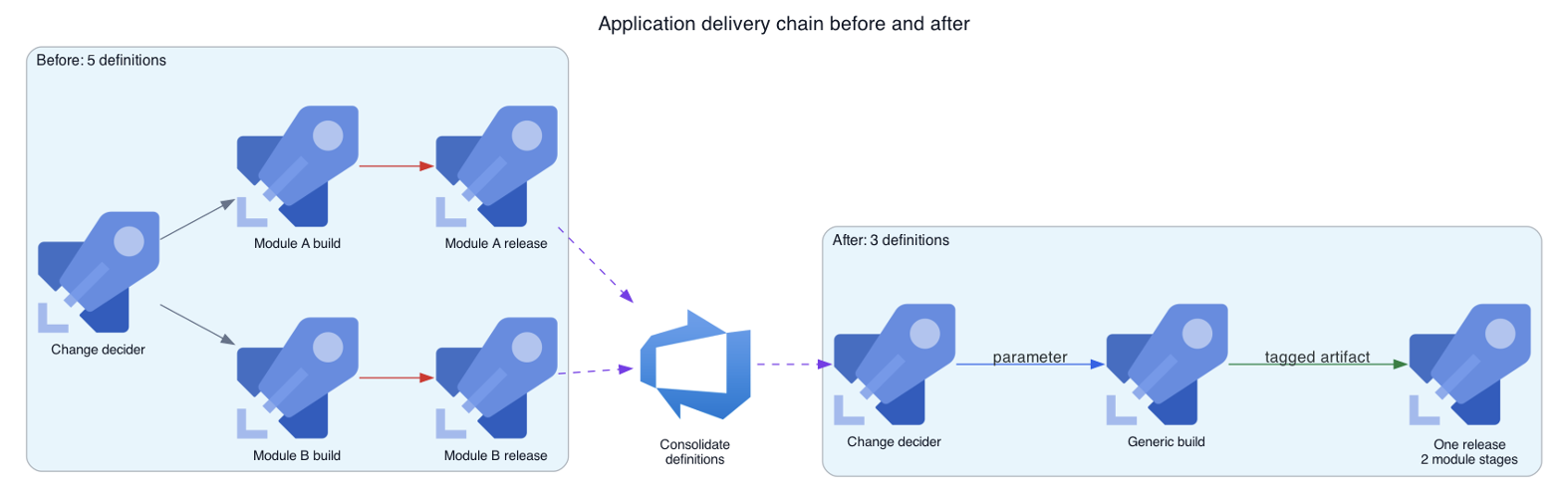
Figure 1. The consolidation removed one duplicated build and one duplicated release.
The Decider Passes the Module as a Run Parameter
The old builds repeated the same image and chart tasks with different module values. The releases repeated the same deployment tasks with different variable groups. A shared build change required matching edits in both build definitions, and a shared deployment change required matching edits in both release definitions. Adding another module would have required another build and release pair.
I named the shared definitions by product, service, scope, and kind:
<Product>.<Service>.<Scope>.<Kind>The decider holds the only continuous integration trigger. It checks changed paths, then queues the generic build with the module and service as parameters. It also fans out shared build-input changes to every registered pair. An optional module value limits manual diagnostic runs.
The decider pins each child to the branch and commit it inspected. A later push cannot change what that child builds. It compares the current commit with its first parent because the protected branch receives changes through merges. Repositories that accept multi-commit direct pushes need to compare the before and after commit IDs from the build event.
The Azure DevOps Build REST API expects parameters as a JSON-encoded string. This reduced example shows the two routing fields and the escaping that preserves their inner quotes:
BODY="{\"definition\":{\"id\":$BUILD_ID},\
\"sourceBranch\":\"$(Build.SourceBranch)\",\
\"sourceVersion\":\"$(Build.SourceVersion)\",\
\"parameters\":\"{\\\"service\\\":\\\"$SERVICE\\\",\\\"module\\\":\\\"$MODULE\\\"}\"}"
The variables that receive those queue-time values must also retain Azure DevOps’s Settable at queue time option, stored as allowOverride: true. A cloned definition can lose that flag. The decider may identify the correct change, then fail when it hands the values to the child build.
Both registered modules resolve to the same generic build.
The Generic Build Adds the Routing Tag
The generic build has no continuous integration trigger. It receives the service and module, derives the image and chart names, publishes the artifact, and tags the run with a value such as module-b.
I first tried module:module-b, but Azure DevOps rejected the colon in the request path. The hyphenated form worked.
I kept the decider separate from the build because a combined design had triggered releases from dispatcher runs that contained no artifact. After the split, every successful generic build produced an artifact for the release.
Stage Conditions Select the Module After Release Creation
Azure DevOps supports tag filters on both the continuous deployment trigger and individual release stages. Each filter controls a different decision.
The definition trigger decides whether Azure DevOps creates a release. A module-a filter there prevents a module-b build from creating any release. The build stays green and the chain stops without a release record.
The stage artifact condition decides which deployment stage runs after Azure DevOps creates the release:
Release trigger
    tag filter: none

Module A stage
    artifact condition: module-a

Module B stage
    artifact condition: module-b
Every qualifying completion of the generic build on the configured branch creates one release. The tag selects the matching module stage. For the nonmatching stage, Artifact conditions not met is an expected skip rather than a deployment failure.
The same status can also describe a malformed condition, so the run summary alone cannot prove correct routing. The branch half adds another ambiguity: the interface displays a short branch name, while the stored condition uses a full refs/heads/... value. I checked the stored condition directly.
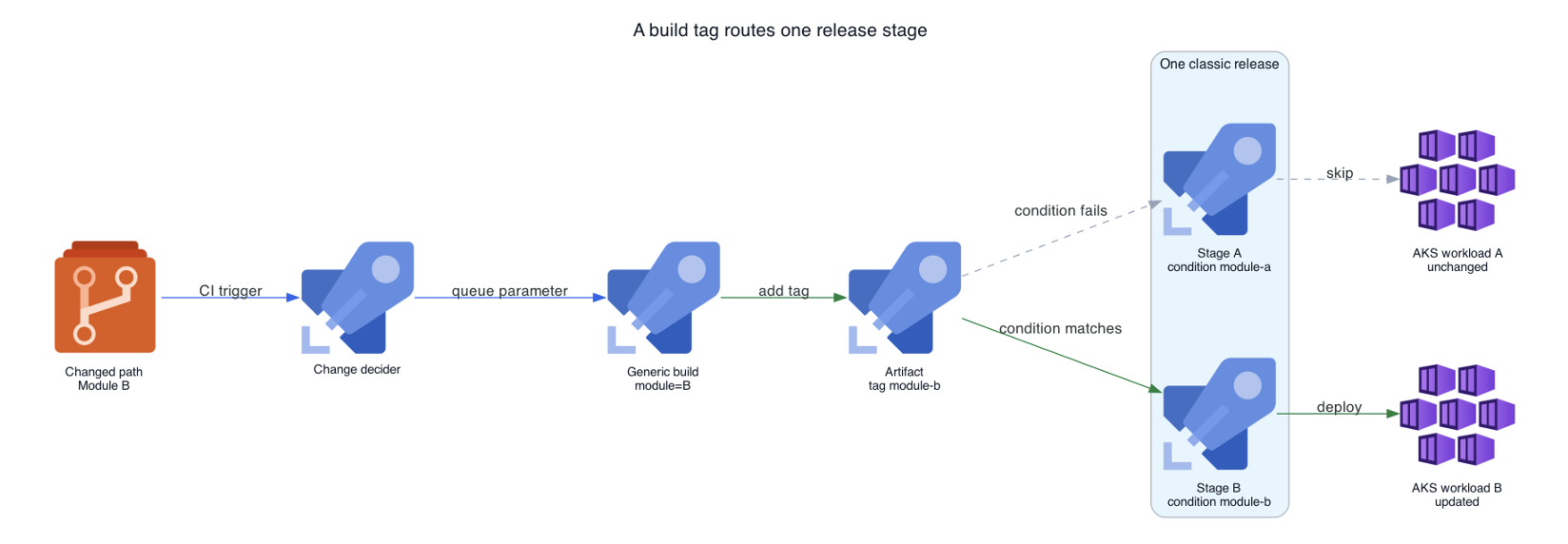
Figure 2. The parameter selects what the build produces. The tag selects which stage deploys it.
I Used the Other Workload as a Control
I tested the consolidated chain with a change for Module B in a nonproduction environment. The decider queued the generic build with Module B, the build added module-b, and Azure DevOps created one release.
The Module B stage completed successfully. The Module A stage reported Artifact conditions not met. I then checked Module A in AKS and confirmed that it still used its previous container image.
Renames Preserved Execution and Left Stale Labels
I renamed the definitions using the service naming scheme. Azure DevOps kept their IDs, so execution references remained valid. Seven build validation policies still displayed the old pipeline name, and I updated those labels separately.
A snapshot of the release definition taken one week later still held the former build name in its artifact metadata. The release continued to bind by ID, but its interface displayed stale text.
The duplicate definitions also carried deployment history. Azure DevOps returned HTTP 409 when I tried to delete a build because a release still retained runs from it. I disabled its trigger, removed the remaining references, and archived it.
Another Module Adds Three Configuration Items
Another module now needs one decider map entry, one variable group, and one release stage. The generic build derives its tag from the queue parameter, so the team adds no module-specific build or release definition.
The application and environment still require their own preparation, including code and Dockerfile support, a database, a broker vhost, variable values, and Kubernetes namespace resources.
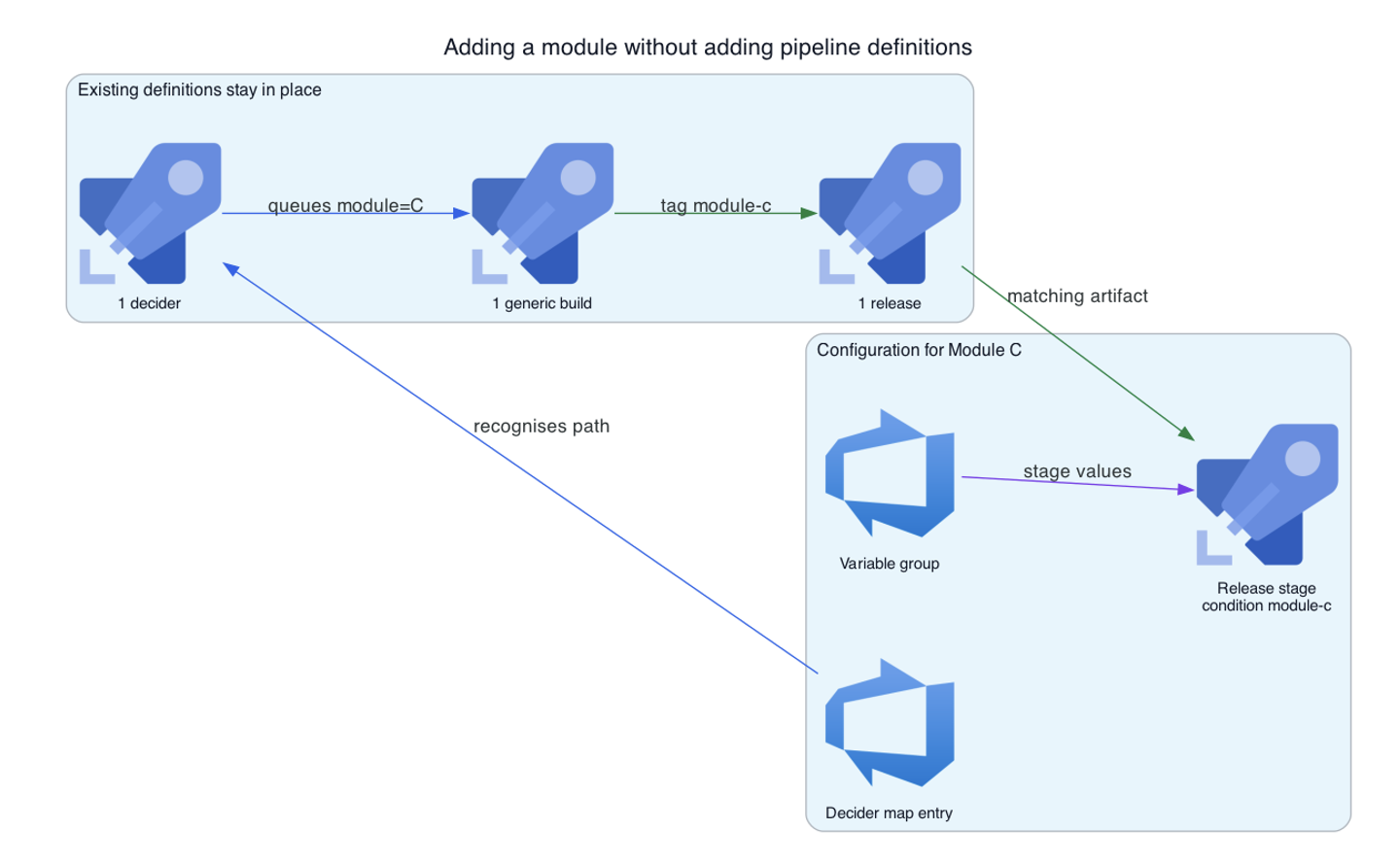
Figure 3. A new module extends the chain without adding a build or release definition.
This pattern fits modules that share a repository, artifact type, build process, and deployment mechanics. A different artifact or approval process may need its own chain. Here, parameters carried the module values, and build tags selected the correct deployment stage.
References
- Azure DevOps REST API: Queue a build
- Azure DevOps REST API: Add build tags
- Microsoft Learn: Classic release triggers and artifact filters
- Microsoft Learn: Build validation branch policies